
The answer comes too late
A traditional feasibility study takes days or weeks. By then the seller has another offer, or you have already fallen for the deal.
Land & Development Feasibility
Get your verdict and the most you should pay for the land in minutes, before you spend weeks on spreadsheets and consultants.
The Problem
A traditional feasibility study takes days or weeks. By then the seller has another offer, or you have already fallen for the deal.
A line counted twice or a missing interest cost will not flag itself. Every model looks great at nine at night.
Strong margins can hide a deal‑killer: a flood zone, a loan the deal cannot carry, or a lot price the market will not pay.
Features
Pulling records, drawing lots and rerunning the math for every what-if. Pencl does the heavy lifting so you can make the call.
Type an address or a tax ID. Pencl pulls the public record for the land before you spend a dollar on it.
See the parcel on a satellite map and watch Pencl lay out streets and lots on its actual shape, not on a square.
Joe is your underwriting partner. Ask out loud or type, and Joe answers with Pencl’s own math on your deal.
Underwrite, decide and present without leaving Pencl.
How It Works
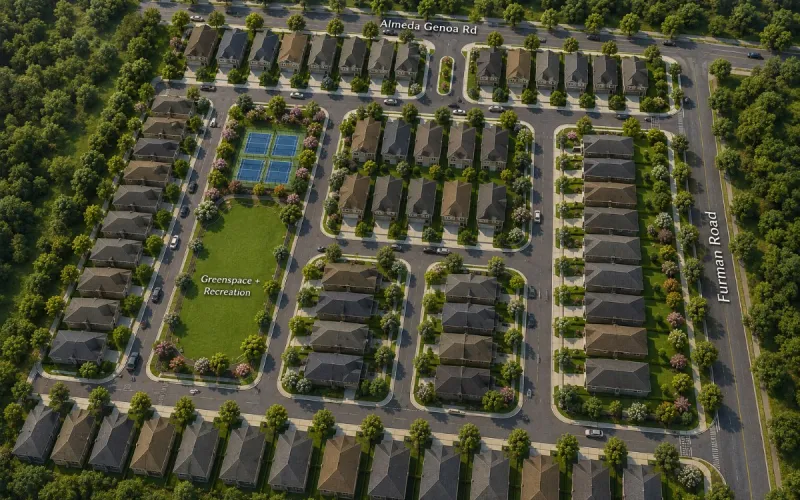
A real deal: The Courts at Almeda Genoa, a single-family subdivision in Houston sold as finished lots to a builder.
Type an address or acreage. The Lot Estimator subtracts what you cannot build on (roads, detention, open space, wetlands and slope) and gives you a realistic lot count with a concept site plan.
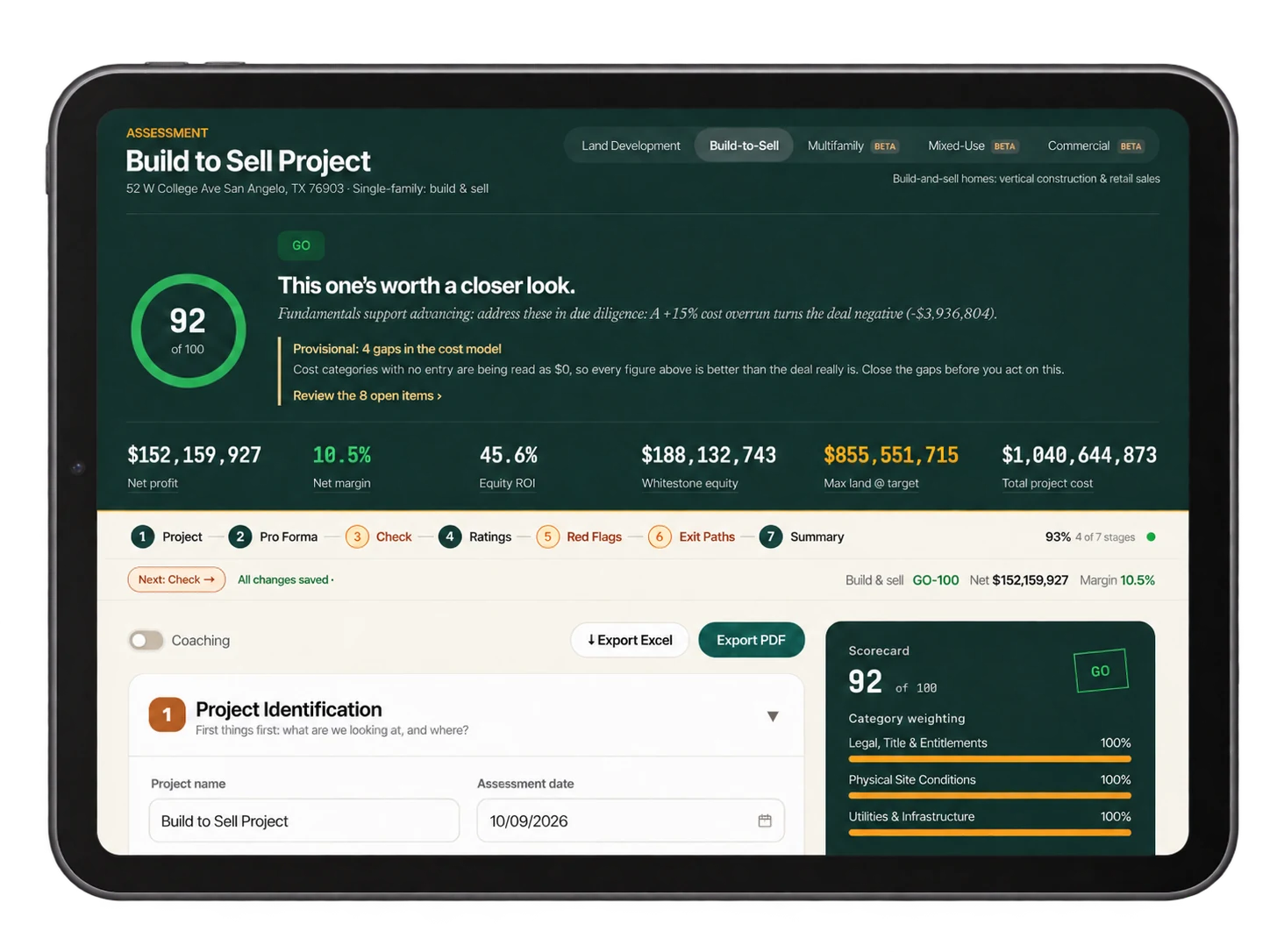
Pick what you are building and Pencl sets up the right pro forma. Your capital stack, loan carry, contingency and fees all recalculate as you type.
Get a scored GO / NO-GO, every deal‑killer it checked, your maximum land offer, and an investment memo you can hand to a partner or lender.
Quick Check
Change any figure and the verdict updates as you type.
Quick check
Try it with your own numbers
A simplified illustration: 30% set aside for roads, drainage and open space; one home per lot; GO needs about a 12% margin. Defaults are set intentionally on the conservative side.
Deal Types
Five deal types, one engine. Pick what you are building and Pencl sets up the right pro forma.

For sale
You develop finished lots and sell them to a builder. Get net margin, return on equity, and the most you should pay for the land.
For sale
You build the homes and sell them. Construction cost by quality tier, buyer upgrades, and how fast the homes sell.

Income Beta
NOI, yield on cost, debt coverage, resale value and eleven stress tests.

Blended Beta
Homes and commercial on one site, blended into one set of numbers.

Income Beta
Retail, office, industrial or flex: debt yield, break-even occupancy and a forward sale.
Check Your Math
Upload your land or build-to-sell pro forma. Pencl checks it line by line and points out anything counted twice. Your model stays yours.
Your file is read on your own computer and never sent to us.
Why Pencl
Feasibility platforms are built for acquisition teams with analysts on staff. Pencl is built for the developer whose own money is in the deal.
| Compare | Your spreadsheet | Feasibility consultant | Pencl |
|---|---|---|---|
| Time to an answer | A weekend, every deal | 2 to 6 weeks | Minutes |
| Cost | Your evenings | $5k to $25k per study | From $79 / month |
| A clear GO / NO-GO | No | In the conclusion, maybe | Scored, every deal |
| Maximum land offer | If you build it | Sometimes | Every deal |
| Deal‑killer checks (flood, debt coverage, lot price) | Manual | Yes | Automatic |
| Catches lines counted twice | No | Depends | Built-in audit |
| Investor-ready memo | You write it | Report | Drafted for you |
| Follows the deal into construction | No | No | Draws, budget vs. actual, QuickBooks |
Testimonials
“It told me to walk away from a parcel I had already fallen for. The flood map proved it right a month later.”
Pricing
If Pencl keeps you from overpaying on one deal, it has paid for itself many times over.
Starter
Screen & underwrite it
$79 /mo
Save $158
Pro Most popular
Defend it
$199 /mo
Save $398
Pencl is a real estate feasibility platform built around one essential question: Does this deal pencil? It brings project assumptions, financial projections, and feasibility insights together so you can run the numbers before the numbers run away with your budget.
Just like “pencil.” We dropped a letter, not the attention to detail.
Developers, builders, investors, and real estate professionals evaluating development opportunities. If you’ve ever looked at a piece of land and thought, “I wonder what I could do with that,” you’re in the right place.
No secret handshake required. Pencl is designed to make feasibility more approachable for beginners while giving experienced users a structured way to evaluate their assumptions. Experience helps, but curiosity is a perfectly good starting point.
Pencl’s focus is land development and residential build-to-sell projects. Whether you’re turning land into lots or lots into homes, the goal is the same: understand the economics before committing.
Multifamily, mixed-use, and commercial assessments are also available on the Enterprise plan.
How’d I know you’d ask that? You’re already thinking about the numbers—we like that.
Starter is $79 per month, and Pro is $199 per month. Enterprise, for teams underwriting multifamily, mixed-use, and commercial property, is $499 per month for three seats.
And we’re just getting started. As Pencl’s capabilities grow, standard pricing will increase.
Early subscribers will keep their starting rate for an introductory period as those prices rise. Consider it a thank-you for seeing the potential early.
Starter helps you answer, “Does this deal pencil?” Pro helps you explore, “What happens if things don’t go quite as planned?”
With Starter at $79 per month, you get three projects and three AI memos per month—a solid starting point for evaluating your next opportunity.
At $199 per month, Pro includes everything in Starter, plus:
Choose Starter for a few opportunities at a time. Choose Pro when you need more capacity, deeper analysis, and greater visibility into your project’s financials.
Bring what you know: property size, asking price, proposed use, and estimated lot or home count. Cost estimates, expected sales prices, financing terms, and timing help sharpen the picture. A promising address is a start; a few solid numbers are even better.
That’s normal. Early-stage deals rarely arrive with every blank filled in. Start with reasonable estimates, then refine your assessment as better information comes in. Treat your early results as a preliminary view of the opportunity, not finished underwriting.
It helps you understand projected costs, revenue, profitability, and how the deal measures up against the assessment’s feasibility criteria. You’ll have a clearer view of what looks promising—and what needs a second look.
Think of them as financial traffic signals. Go means the deal meets the assessment’s criteria. Conditional means concerns need attention. No-Go means it falls short under the current assumptions.
These signals apply to land development and build-to-sell projects. Multifamily, mixed-use, and commercial assessments show a preliminary screen—how many of the assessment’s thresholds the deal meets—rather than a Go or No-Go.
These signals guide your review; they aren’t approvals or guarantees. Even with a green light, you still need to look both ways.
Yes. Pencl can help estimate the maximum land price a project can support while meeting your target return. The asking price starts the conversation. Your numbers help you decide where it should end.
Yes. Adjust assumptions such as acquisition price, development costs, sales prices, or timing to see how the projected outcome changes.
Pro adds dedicated sensitivity and cost-overrun stress tests to help you explore how much pressure a deal can handle. “What if?” is much less expensive to ask before you close.
Pencl helps you evaluate acquisition costs, development costs, projected lot yield, and lot sales revenue together. It helps you move from “this property has potential” to a clearer understanding of whether the proposed project makes financial sense.
Pencl helps you assess whether expected home sales can cover land, construction, financing, and other project costs while leaving enough profit to meet your goals. A beautiful home deserves an equally well-considered budget.
The Lot Estimator helps you explore a conceptual lot count for a property. Think of it as an early sketch of the possibilities. It’s a starting point for feasibility, not an engineered site plan or confirmation of how many lots a jurisdiction will approve.
Ask Pencl is the platform’s AI question-and-answer feature. It helps you work through development concepts and understand your analysis. When a term or number makes you pause, you have somewhere to start asking questions.
We respect a good spreadsheet. Pencl provides a guided assessment process that connects your inputs to financial results and feasibility insights, helping you spend more time evaluating the deal and less time wrestling with the workbook.
Good inputs make for more useful results. Pencl evaluates the assumptions you provide, so replace preliminary estimates with verified information as it becomes available. Optimism is welcome; realistic cost and revenue assumptions do the heavy lifting.
No. Pencl supports financial feasibility analysis, but you still need to verify zoning, access, utilities, drainage, title, environmental conditions, and other site requirements.
Keep your engineer, attorney, and other qualified professionals in the loop. They’re still on the team. Optional lookup tools can support your research, but they don’t replace site-specific verification.
Yes. It can help you explain your assumptions, discuss projected economics, and identify unanswered questions. Pro includes branded PDF reports and AI memo exports to Word to help you present that analysis.
Think of it as a stronger opening conversation—not an automatic funding approval. Lenders and investors may require additional documentation and their own underwriting.
No crystal ball included. A favorable assessment means the numbers work under the assumptions evaluated. Costs, markets, approvals, financing, and execution can change the outcome.
Pencl helps you make a more informed decision before real money meets real dirt.
Run a real site through Pencl before you spend a dollar on it.